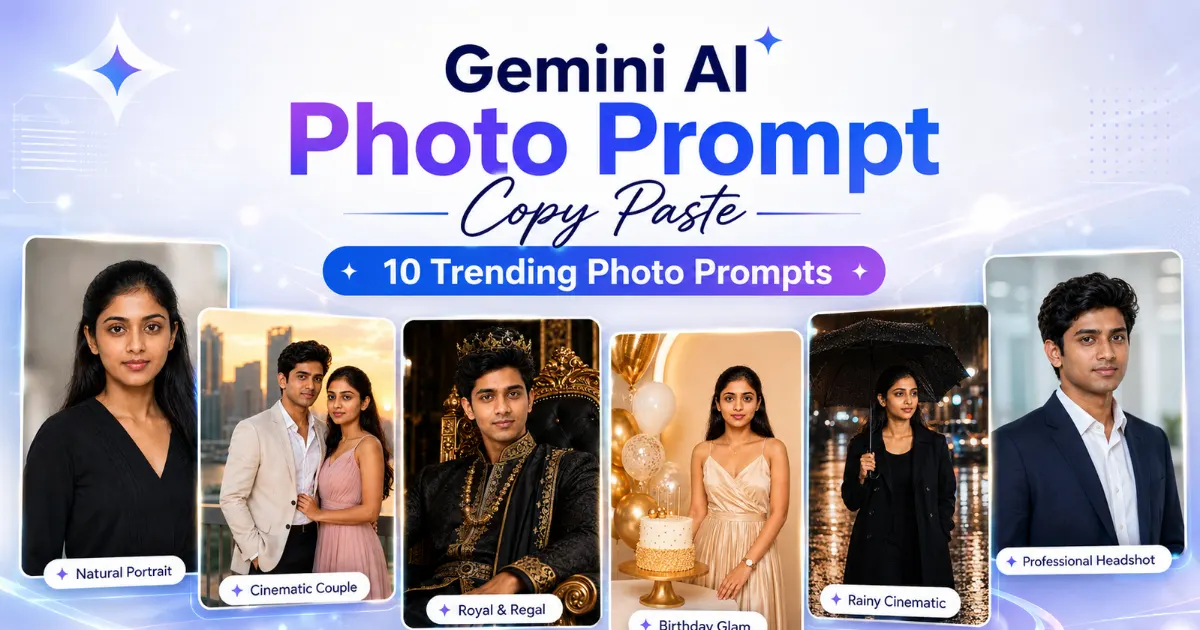
Looking for Gemini AI photo prompt copy paste examples that can help you create realistic, stylish, and social-media-ready photos? This guide includes ready-made prompts for portraits, couple edits, birthday posters, royal looks, bike and car attitude photos, festival images, LinkedIn profile photos, and travel-style pictures.
Copy any prompt below and replace simple details like [person], [outfit], [background], [mood], and [ratio]. For better face consistency, upload a clear reference photo and keep your instructions simple.
Each prompt includes a preview idea, customization details, recommended ratio, Gemini tip, negative prompt, and safety note so you can create cleaner AI images without writing prompts from scratch.
Quick Answer
A good Gemini AI photo prompt should clearly describe the subject, outfit, background, lighting, mood, camera style, image ratio, and negative prompt.
Instead of writing:
“Make my photo stylish.”
Use a clear prompt like:
Create a realistic cinematic portrait of [person] wearing [outfit], standing in [background], with soft golden lighting, natural skin texture, balanced DSLR-style framing, shallow depth of field, and premium color grading. Ratio: 4:5.
Quick Prompt Navigation
| Prompt Style | Best For | Best Ratio |
|---|---|---|
| Realistic Instagram Portrait | DP, profile photo, social media | 4:5 |
| Cinematic Couple Photo | Couple edit, romantic post | 16:9 / 4:5 |
| Royal King Style Photo | Birthday poster, attitude DP | 9:16 |
| Luxury Birthday Studio Photo | Birthday wishes poster | 9:16 |
| Bike or Car Attitude Photo | Boys attitude photo, reel cover | 9:16 |
| Traditional Indian Outfit Photo | Festival, wedding-style edit | 4:5 / 9:16 |
| Rainy Street Cinematic Photo | Moody, romantic, cinematic photo | 9:16 |
| LinkedIn Profile Photo | Professional profile photo | 1:1 |
| Travel Lifestyle Photo | Instagram travel post | 4:5 |
| Festival Celebration Photo | Diwali, Holi, Eid, Christmas, New Year | 9:16 |
How to Use These Gemini AI Photo Prompts
Choose the photo style you want, then replace only the key bracket details such as [person], [outfit], [background], [festival], or [vehicle type]. You do not need to rewrite the full prompt unless you want a completely different result.
If you are using your own photo, upload a clear front-facing image first. Then ask Gemini to preserve the natural face identity while changing the outfit, background, lighting, or photo style.
Use these ratio suggestions:
| Use Case | Best Ratio |
|---|---|
| Instagram post | 4:5 |
| WhatsApp status / Reels | 9:16 |
| Profile photo | 1:1 |
| Blog image / YouTube thumbnail | 16:9 |
For cleaner results, add this type of negative prompt:
Negative Prompt: blurry face, wrong face, extra fingers, distorted hands, bad anatomy, watermark, text errors, low quality.
Safe Use Note: Use your own photos or images you have permission to edit. Avoid asking Gemini to copy exact celebrity faces, copyrighted characters, movie posters, brand logos, or private photos without consent. AI may not preserve the exact face every time, so use a clear reference image and keep the prompt simple.
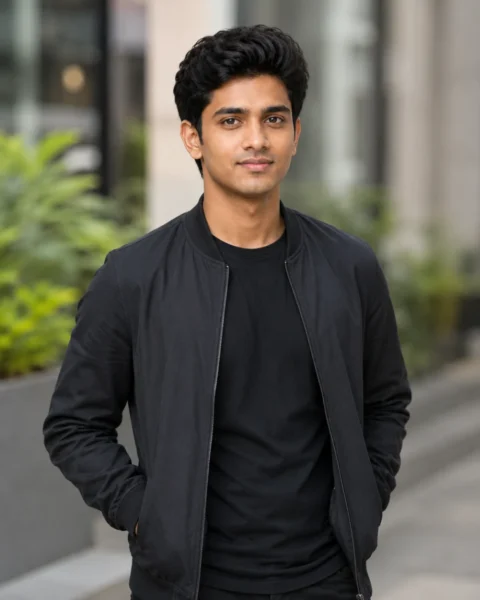
1. Realistic Instagram Portrait Prompt
Best For: Instagram DP, profile photo, stylish social media image
Preview Image Idea:
Copy-Ready Prompt:
Create a realistic Instagram-style portrait of [person] wearing [outfit], standing in a [background]. Use soft cinematic lighting, natural skin texture, sharp face details, shallow depth of field, balanced portrait framing, clean colors, and a confident natural pose. Keep the photo realistic and social-media-ready. Ratio: 4:5.
Customize These Details:
[person], [outfit], [background], [pose], [mood]
Recommended Ratio: 4:5
Gemini Tip:
Upload a clear face photo first if you want the result to look closer to the original person.
Negative Prompt:
blurry face, wrong face, extra fingers, bad hands, cartoon, plastic skin, watermark, text, low quality, distorted eyes
Pro Tip:
Use a simple background like a cafe, street, studio wall, garden, or city walkway. Simple backgrounds usually make the face and outfit look better.
Safety Note:
Do not ask for an exact celebrity face or copied famous-person likeness.
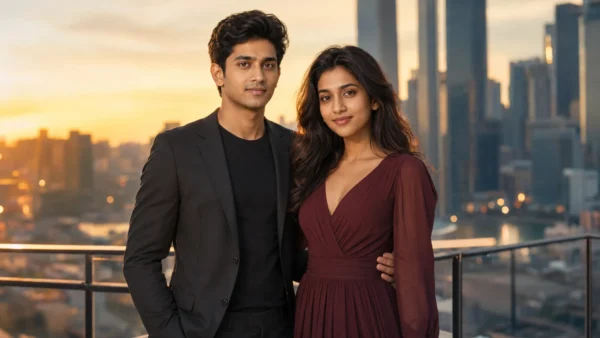
2. Cinematic Couple Photo Prompt
Best For: Couple edits, romantic posts, pre-wedding style images
Preview Image Idea:
Copy-Ready Prompt:
Create a cinematic realistic couple photo of [man] and [woman] standing together near a modern city skyline during golden hour. The man is wearing [man outfit] and the woman is wearing [woman outfit]. Add warm sunset lighting, a natural romantic pose, soft background blur, realistic facial details, elegant color grading, and a premium lifestyle photography look. Ratio: 16:9.
Customize These Details:
[man outfit], [woman outfit], [location], [time of day], [mood]
Recommended Ratio: 16:9 or 4:5
Gemini Tip:
If you upload two reference photos, keep both images clear and front-facing. Avoid blurry selfies or heavy filters.
Negative Prompt:
wrong face, distorted hands, extra fingers, duplicate people, blurry, over-smooth skin, watermark, low quality
Pro Tip:
Keep the pose simple. Standing together, walking side by side, or holding hands usually looks more realistic than complex poses.
Safety Note:
Use your own photos or photos you have permission to edit.
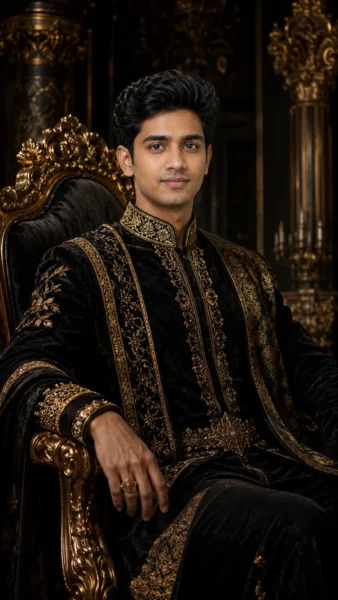
3. Royal King Style Photo Prompt
Best For: Birthday poster, attitude photo, premium profile image
Preview Image Idea:
Copy-Ready Prompt:
Create a royal king-style realistic portrait of [person] sitting on a luxury royal chair, wearing [outfit]. Use a dark black and gold palace-inspired background, dramatic side lighting, premium shadows, confident expression, detailed outfit texture, sharp face details, and a luxury poster-style composition. Ratio: 9:16.
Customize These Details:
[outfit], [background color], [chair style], [pose], [mood]
Recommended Ratio: 9:16
Gemini Tip:
Use “subtle royal style” if you want the image to look premium instead of overdecorated.
Negative Prompt:
cartoon look, crown distortion, blurry face, extra fingers, bad anatomy, watermark, text error, fake skin
Pro Tip:
Avoid adding too many props like crown, sword, throne, smoke, palace, fire, and gold particles together. A cleaner royal setup looks more professional.
Safety Note:
Avoid copyrighted movie characters, brand logos, or famous personality references.
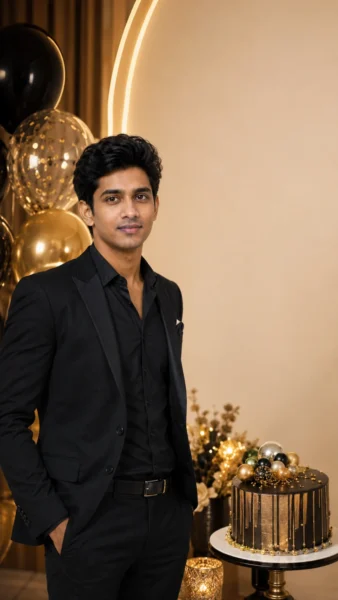
4. Luxury Studio Birthday Photo Prompt
Best For: Birthday poster, birthday wishes image, premium birthday edit.
Preview Image Idea:
Copy-Ready Prompt:
Create a luxury birthday studio photo of [person] wearing [outfit], standing beside a premium birthday cake and elegant balloons. Use a clean beige and gold studio background, soft shadows, warm lights, simple birthday decoration, natural smile, sharp face details, and a modern birthday poster mood. Leave clean empty space for birthday text. Ratio: 9:16.
Customize These Details:
[name], [outfit], [background color], [decoration style], [birthday theme]
Recommended Ratio: 9:16
Gemini Tip:
Generate the image without text first, then add the name and birthday message manually in Canva or your editor.
Negative Prompt:
misspelled text, bad face, extra fingers, low quality, watermark, distorted cake, unrealistic lighting
Pro Tip:
For better poster design, keep one side of the image slightly empty so you can add “Happy Birthday” and the name later.
Safety Note:
AI tools often make spelling mistakes, so avoid asking Gemini to write long text inside the image.
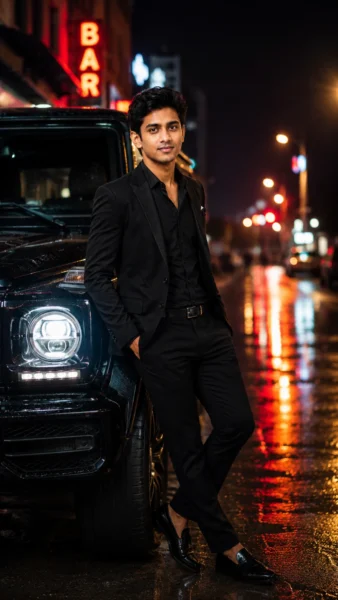
5. Bike or Car Attitude Photo Prompt
Best For: Boys attitude photo, Instagram reel cover, stylish DP
Preview Image Idea:
Copy-Ready Prompt:
Create a realistic attitude photo of [person] leaning casually beside a [vehicle type], wearing [outfit], on a cinematic street background at night. Add soft neon lighting, wet road reflections, confident body language, sharp outfit texture, natural face details, realistic vehicle shape, and stylish urban photography mood. Ratio: 9:16.
Customize These Details:
[vehicle type], [outfit], [city], [lighting], [pose]
Recommended Ratio: 9:16
Gemini Tip:
Add “no visible brand logo” if you want a safer and cleaner vehicle image.
Negative Prompt:
wrong vehicle shape, distorted hands, extra fingers, blurry face, fake skin, watermark, text, logo distortion
Pro Tip:
Mention the exact vehicle type, like “black sports bike,” “white SUV,” or “matte black car,” instead of using a real brand name.
Safety Note:
Do not use trademarked logos clearly in the image unless you have permission.
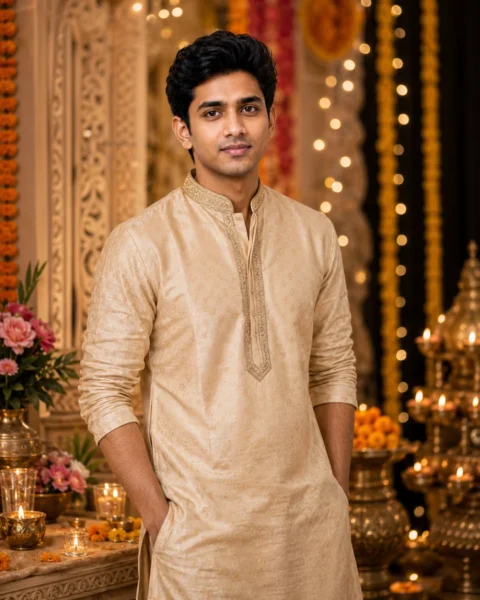
6. Traditional Indian Outfit Photo Prompt
Best For: Festival photo, wedding-style edit, cultural portrait
Preview Image Idea:
Copy-Ready Prompt:
Create a realistic traditional Indian portrait of [person] wearing [traditional outfit], standing in a beautiful festive background with warm diya lights, soft flowers, elegant decor, natural pose, detailed fabric texture, soft background depth, and a clean respectful cultural mood. Ratio: 4:5.
Customize These Details:
[festival], [outfit], [decor], [background], [mood]
Recommended Ratio: 4:5 or 9:16
Gemini Tip:
Use simple cultural details like warm lights, flowers, and traditional outfit instead of overloading the scene.
Negative Prompt:
overdecorated background, blurry face, bad hands, extra fingers, cartoon, watermark, text mistakes, unrealistic jewelry
Pro Tip:
A clean outfit description works best. Example: “cream kurta with golden border” or “red saree with simple jewelry.”
Safety Note:
Keep religious and cultural visuals respectful.
7. Rainy Street Cinematic Photo Prompt
Best For: Romantic, emotional, moody, and cinematic edits
Preview Image Idea:
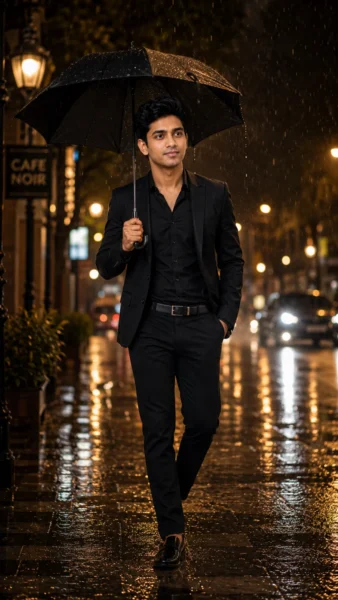
Copy-Ready Prompt:
Create a cinematic realistic rainy street photo of [person] wearing [outfit], walking with a [umbrella color] umbrella on a wet road at night. Add glowing street lights, soft rain, wet road reflections, moody contrast, natural face details, shallow depth of field, realistic atmosphere, and premium film-style color grading. Ratio: 9:16.
Customize These Details:
[outfit], [umbrella color], [city], [mood], [time of day]
Recommended Ratio: 9:16
Gemini Tip:
Use words like “soft rain,” “wet road reflections,” and “glowing street lights” for a more cinematic look.
Negative Prompt:
fake rain, blurry face, distorted umbrella, extra fingers, bad hands, watermark, low quality, unnatural reflection
Pro Tip:
Avoid asking for heavy storm, traffic, flying hair, dramatic pose, and neon lights all together. Too many effects can make the image look fake.
Safety Note:
Avoid unsafe traffic scenes or risky road poses.
8. Professional LinkedIn Profile Photo Prompt
Best For: LinkedIn profile, portfolio photo, business profile image
Preview Image Idea:

Copy-Ready Prompt:
Create a professional realistic LinkedIn profile photo of [person] wearing a [formal outfit], standing against a clean modern office background. Use balanced head-and-shoulders framing, soft studio lighting, natural facial details, friendly confident expression, clean background separation, and premium corporate photography style. Ratio: 1:1.
Customize These Details:
[formal outfit], [background], [expression], [profession], [lighting]
Recommended Ratio: 1:1
Gemini Tip:
Use a plain office, grey studio, or soft indoor background for a professional result.
Negative Prompt:
fake smile, blurry face, distorted eyes, bad hands, cartoon, over-smooth skin, watermark, messy background
Pro Tip:
Do not add too many props. For LinkedIn, a clean blazer, simple background, and natural expression work best.
Safety Note:
Do not misrepresent official uniforms, company branding, or job roles.
9. Travel Lifestyle Photo Prompt
Best For: Instagram travel photo, lifestyle post, profile image
Preview Image Idea:
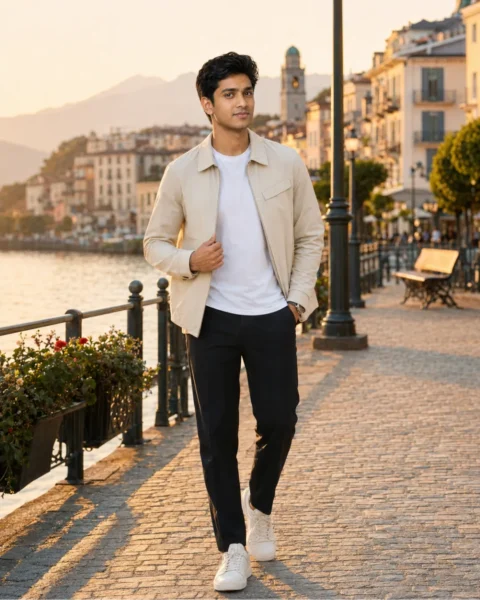
Copy-Ready Prompt:
Create a realistic travel lifestyle photo of [person] wearing [outfit], standing at [travel location] during [time of day]. Add natural sunlight, relaxed candid movement, beautiful background depth, clean colors, realistic face details, and premium travel photography mood. Ratio: 4:5.
Customize These Details:
[location], [outfit], [time of day], [pose], [mood]
Recommended Ratio: 4:5
Gemini Tip:
Choose one location style only, such as beach, mountain, city street, desert, or luxury resort.
Negative Prompt:
unrealistic background, blurry face, extra fingers, distorted body, watermark, text, fake sky, overprocessed colors
Pro Tip:
Add “candid travel photo” if you want the image to look natural instead of like a studio poster.
Safety Note:
Avoid private property, restricted areas, and visible brand logos unless you have permission.
10. Festival Celebration Photo Prompt
Best For: Diwali, Holi, Eid, Christmas, New Year, birthday festival-style posts
Preview Image Idea:
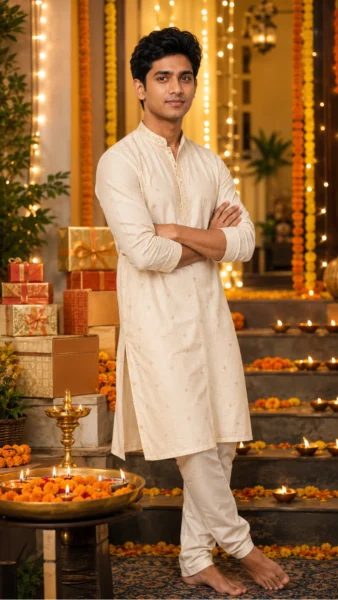
Copy-Ready Prompt:
Create a realistic festive celebration photo of [person] wearing [outfit], standing in a beautiful [festival] decoration setup with warm lights, flowers, gifts, and soft background blur. Keep the mood joyful, clean, premium, family-friendly, and realistic. Add natural face details, elegant color grading, and balanced festive composition. Ratio: 9:16.
Customize These Details:
[festival], [outfit], [decoration], [mood], [background]
Recommended Ratio: 9:16
Gemini Tip:
Mention the festival clearly, but keep the background simple and respectful.
Negative Prompt:
messy background, wrong festival elements, blurry face, extra fingers, bad hands, watermark, text error, low quality
Pro Tip:
Create the photo first, then add festival greetings manually for better spelling and design control.
Safety Note:
Keep festival visuals respectful and avoid stereotypes.
Customization Guide for Better Gemini Photo Results
Use this simple formula:
Subject + Outfit + Background + Lighting + Mood + Camera Style + Ratio + Negative Prompt
| Detail | Example |
|---|---|
| Subject | young man, woman, couple, family |
| Outfit | black blazer, saree, kurta, gown, casual shirt |
| Background | city skyline, studio, beach, village, luxury room |
| Mood | romantic, royal, cinematic, emotional, stylish |
| Lighting | golden hour, soft studio light, neon light |
| Camera Style | DSLR-style photo, shallow depth of field, portrait photography |
| Ratio | 9:16, 4:5, 1:1, 16:9 |
A strong prompt gives Gemini clear direction. A weak prompt like “make this photo stylish” may create random results. A detailed prompt gives better control over the face, outfit, lighting, background, and mood.
Negative Prompt Tips
Use this general negative prompt for most Gemini AI photo prompts:
Negative Prompt:
blurry face, wrong face, extra fingers, distorted hands, bad anatomy, cartoon look, plastic skin, over-smoothed face, watermark, text errors, low quality, duplicate person, unrealistic eyes
You can adjust it based on the image. For a vehicle image, add distorted vehicle or wrong vehicle shape. For a birthday or festival image, add misspelled text if you want to avoid AI-generated text errors.
Common Mistakes to Avoid
- Do not write very short prompts. Short prompts usually create random results.
- Do not add too many backgrounds in one prompt. One clear background is better.
- Do not ask for exact celebrity faces, copyrighted characters, movie posters, or brand logos.
- Do not forget the image ratio. Ratio matters for Instagram, WhatsApp, blog images, and profile photos.
- Do not rely on AI text inside the image. Add text manually later for cleaner spelling.
- Do not use blurry or side-facing reference photos if face consistency is important.
You can check more ideas: Best Couple Prompt for Gemini AI
Conclusion
These Gemini AI photo prompt copy paste examples are made to help you create realistic, stylish, and social-media-ready images quickly. Start with one prompt, customize the outfit and background, choose the right ratio, and add a negative prompt for better quality.
For the best result, test 2 to 4 versions of the same prompt. Small changes in lighting, pose, background, and mood can make a big difference.
Frequency Asked Questions
What is a Gemini AI photo prompt?
A Gemini AI photo prompt is a text instruction that tells Gemini what kind of image or photo edit you want. It can include the subject, outfit, background, lighting, mood, camera style, and ratio.
Can I copy and paste these Gemini prompts?
Yes. You can copy and paste these prompts directly. Replace the bracket details like [outfit], [background], [person], and [mood] with your own idea.
Which ratio is best for Gemini AI photo prompts?
Use 9:16 for Reels and WhatsApp status, 4:5 for Instagram posts, 1:1 for profile photos, and 16:9 for blog images or YouTube-style thumbnails.
How do I get realistic results in Gemini?
Use clear subject details, natural lighting, realistic skin texture, DSLR-style photo wording, and a negative prompt. A clear reference photo also helps if you want better face consistency.
Can I use my own photo with these prompts?
Yes, if your Gemini version supports image input. Upload a clear photo and ask Gemini to preserve the natural face while changing the outfit, background, or style.
How can I make Gemini preserve my face better?
Use a clear, front-facing, high-quality image. Avoid heavy filters, side poses, sunglasses, low light, and too many style changes in one prompt.
Can I use these prompts for commercial images?
You can use these prompts for original images, but avoid celebrity likeness, copyrighted characters, trademarked logos, and private photos without permission. Also check the usage rights of the AI tool you are using.