
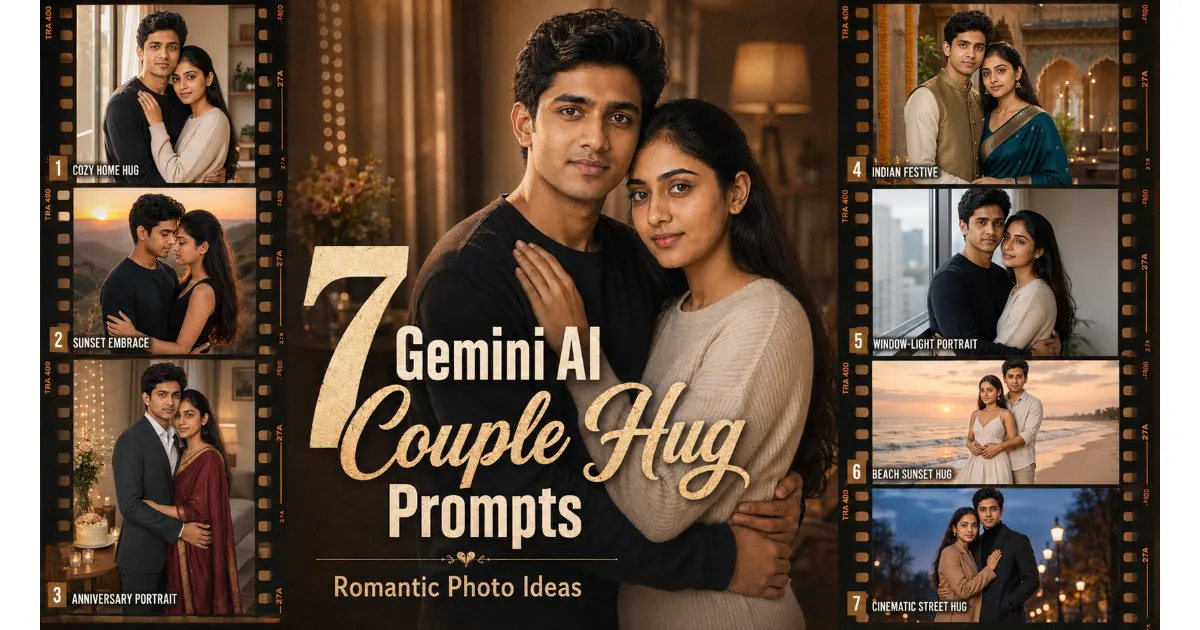
A detailed couple hug prompts for Gemini AI can transform two reference photos into a warm, realistic portrait with a new pose, outfit, setting, lighting style, and composition.
Instead of sharing dozens of similar ideas, this guide focuses on seven distinct styles. You will find prompts for a cozy home portrait, a cinematic sunset embrace, an anniversary photo, a traditional Indian look, a natural window-light portrait, a beach scene, and a vertical social media image.
Each prompt includes editable details, a recommended aspect ratio, an avoid instruction, and a practical tip for improving the result. You can begin with one clear couple photo or upload separate portraits of both people.
Use only photos you own or have permission to edit. Image-generation results can vary, so create a few versions and correct one issue at a time instead of repeatedly replacing the entire prompt.
Quick Answer
A useful Gemini couple-hug prompt should explain:
- Who appears in the image
- Where each person stands
- The type of hug
- Visible hand placement
- Clothing and accessories
- Background and time of day
- Lighting and camera framing
- Mood and color palette
- Face-preservation requirements
- Final aspect ratio
- Elements the tool should avoid
When uploading two separate photos, label them as Person One and Person Two. Mention their clothing or left-right positions so the tool is less likely to confuse their identities.
Start here: Upload two clear reference photos, choose one of the seven prompts below, and replace the bracketed details with your preferred clothing, background, colors, and image ratio.
Who Can Use These Prompts?
These prompts can help:
- Couples creating personalized portraits
- Husbands and wives making anniversary images
- Long-distance couples creating reunion-style visuals
- Instagram and Pinterest creators
- Bloggers and visual-content publishers
- Mobile photo editors
- AI image beginners
- People designing personalized gifts
- Small businesses offering custom photo edits
These prompts are intended for consenting adults. Do not use them to create romantic images involving minors, celebrities, public figures, non-consenting individuals, or people whose photos you are not authorized to edit.
How to Use Couple Hug Prompts in Gemini AI
Choose the Closest Style
Start with the prompt that already matches your preferred pose, background, and mood. Combining several unrelated scenes in one request can lead to inconsistent faces, unnatural hands, or a crowded composition.
Replace the Bracketed Details
Edit fields such as:
[outfit][background][color palette][lighting][expression][aspect ratio]
You do not need to change every detail. A focused prompt is often easier for an image tool to interpret.
Upload Clear Reference Photos
You can begin with:
- One existing couple photograph
- Two separate front-facing portraits
- One joint photo with additional close-up references
Identify Each Person Clearly
Add a simple instruction:
The first uploaded photo is Person One. The second uploaded photo is Person Two. Person One stands on the left wearing
[outfit], while Person Two stands on the right wearing[outfit].
This gives the image tool a clearer structure to follow.
Review the First Result
Check:
- Facial resemblance
- Relative head size
- Eye direction
- Hand and finger placement
- Arm position
- Body proportions
- Clothing details
- Background quality
- Final crop
Correct One Issue at a Time
When most of the image looks good, keep the successful details unchanged. Ask the tool to correct only the damaged hand, inaccurate face, distracting object, or awkward pose.
How to Choose Better Reference Photos
Use photos with:
- Clear facial details
- Open and visible eyes
- Balanced lighting
- Natural skin texture
- Minimal beauty filters
- A front-facing or slightly angled pose
- Enough resolution to show recognizable features
- No heavy shadows covering the face
Avoid blurry screenshots, distant group photographs, strong filters, sunglasses, motion blur, or images where most of the face is hidden.
Two separate close-up portraits may provide better facial information than one distant full-body couple photograph.
Reusable Face-Preservation Instruction
Add this block after any prompt when facial resemblance matters:
Use the first uploaded image as the facial reference for Person One and the second uploaded image as the facial reference for Person Two. Preserve both identities independently. Keep their recognizable facial structure, natural skin tone, eye shape, hairstyle, age, and facial proportions consistent. Do not swap, merge, average, beautify, reshape, or over-smooth their faces.
Best Couple Hug Prompts for Gemini AI
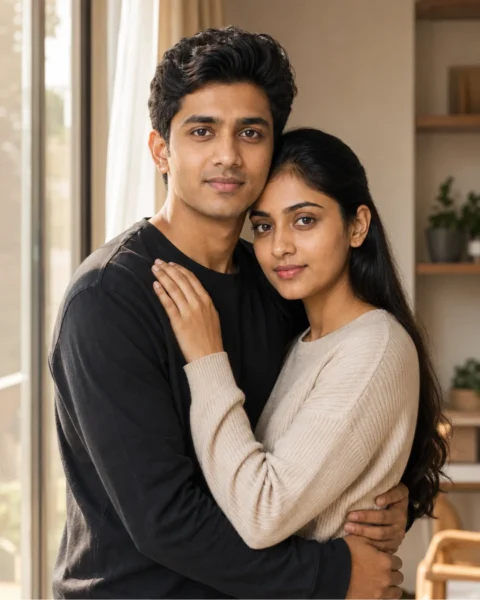
1. Cozy Morning Hug at Home
Best For: Lifestyle portraits, anniversary posts, and personal memories
Copy-Ready Prompt:
Create a highly realistic lifestyle portrait of two consenting adults sharing a gentle morning hug inside a bright, comfortable home. Person One wears [a casual dark charcoal-black long-sleeve T-shirt], while Person Two wears [a casual soft beige-cream ribbed knit sweater].
Place them beside a large window. One person wraps both arms naturally around their partner’s waist, while the other rests one visible hand gently on their partner’s shoulder. Keep their posture relaxed and their fingers naturally positioned.
Use warm morning sunlight, neutral home décor, realistic fabric detail, natural skin texture, and subtle background blur. Frame the scene with the balanced perspective of a 50mm lifestyle photograph. Their expressions should feel peaceful, affectionate, and genuine rather than staged.
Apply the reusable face-preservation instruction. Create the image in a vertical [4:5] aspect ratio.
Customize: Clothing, room décor, time of day, interior colors, pose direction
Recommended Ratio: 4:5
Best Tool to Try: Gemini AI
Avoid:
Swapped faces, merged arms, extra fingers, stiff shoulders, plastic-looking skin, exaggerated smiles, cluttered décor, text, logos, and watermarks.
Pro Tip: Ask for both visible hands to remain separate when the embrace looks awkward.
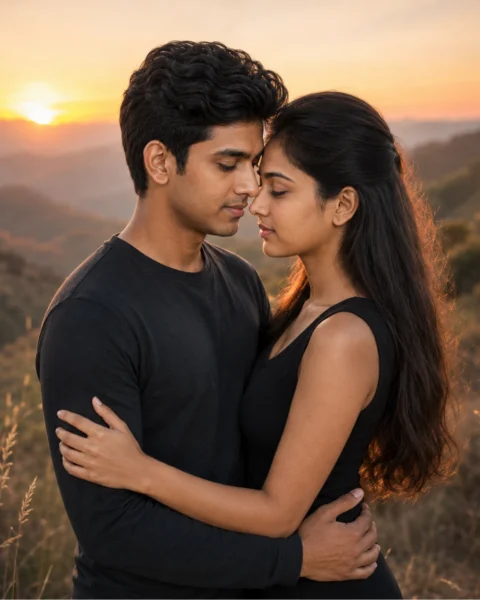
2. Golden-Hour Sunset Embrace
Best For: Cinematic romantic portraits and social media posts
Copy-Ready Prompt:
Create a cinematic portrait of an adult couple sharing a close embrace on an open hillside during golden hour. Person One wears [a casual black long-sleeve shirt], while Person Two wears [a fitted black sleeveless top].
Turn them slightly toward each other, with their foreheads almost touching. Place one visible hand around the waist and the other on the upper back. Keep both hands natural and easy to see.
Add a warm sunset sky, distant hills, soft rim light around their hair, realistic clothing texture, balanced facial exposure, and gentle background separation associated with an 85mm portrait lens.
The mood should feel calm, romantic, and sincere without theatrical poses or exaggerated expressions.
Apply the reusable face-preservation instruction. Use a vertical [4:5] aspect ratio.
Customize: Landscape, clothing, sunset colors, camera distance, facial expression
Recommended Ratio: 4:5
Best Tool to Try: Gemini AI or Leonardo AI
Avoid:
Dark faces, excessive lens flare, merged arms, extra fingers, oversaturated orange tones, artificial skin, dramatic crying, text, logos, and watermarks.
Pro Tip: Add “keep both faces evenly exposed” when the sunset leaves one face too dark.
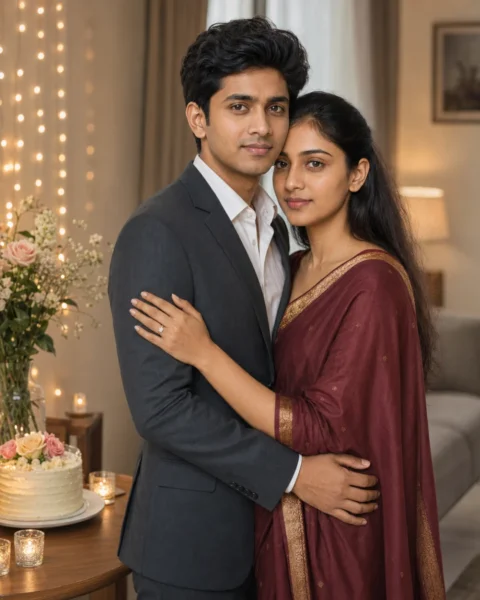
3. Warm Anniversary Portrait
Best For: Husband-and-wife images, anniversary cards, and keepsakes
Copy-Ready Prompt:
Create an elegant anniversary portrait of an adult husband and wife sharing a warm standing hug in a softly decorated home.
The husband wears [a formal dark charcoal-gray suit with a white dress shirt], while the wife wears [an elegant maroon-burgundy sari with a gold border]. Position them close together with relaxed shoulders, visible hands, and believable arm placement.
Include a small table with flowers, warm decorative lights, and a simple anniversary cake without readable writing. Combine soft window light with gentle ambient lighting. Use realistic clothing detail, natural skin texture, and an eye-level 85mm portrait composition.
Their expressions should feel affectionate, mature, and comfortable. Preserve age-appropriate facial features without artificial beautification.
Apply the reusable face-preservation instruction. Create the image in a vertical [4:5] aspect ratio.
Customize: Clothing, anniversary colors, flowers, room décor, cake design
Recommended Ratio: 4:5
Best Tool to Try: Gemini AI
Avoid:
Changed age, artificial youthfulness, incorrect cake text, blended faces, extra fingers, excessive decorations, plastic skin, logos, and watermarks.
Pro Tip: Leave the cake blank and add the anniversary message later in Canva or another design app.
Check More: 7 Gemini AI Retro Couple Photo Prompts to Copy
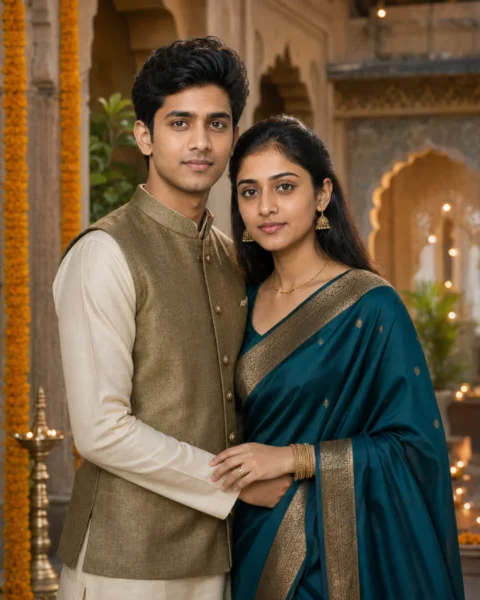
4. Elegant Indian Festive Couple
Best For: Festival greetings, traditional portraits, and cultural posts
Copy-Ready Prompt:
Create a respectful, photorealistic portrait of an adult Indian couple sharing a gentle side hug in an elegant festive courtyard.
Person One wears [a traditional cream kurta in a smooth silk-like fabric with an olive-gold textured Nehru jacket], while Person Two wears [a traditional deep teal silk sari with a gold woven border]. Coordinate the colors without making the clothing identical.
Include subtle marigold decorations, warm lamps, heritage-inspired architecture, realistic embroidery, restrained jewelry, and soft evening light. Their posture should feel comfortable and dignified, with visible hands and believable finger placement.
Frame the portrait with the visual character of an 85mm editorial lens and a softly focused background. Preserve the couple’s natural skin tones, age, facial proportions, and recognizable features.
Apply the reusable face-preservation instruction. Use a vertical [4:5] aspect ratio.
Customize: Regional clothing, fabrics, color palette, jewelry, festive décor
Recommended Ratio: 4:5
Best Tool to Try: Gemini AI
Avoid:
Incorrect cultural accessories, costume-like clothing, excessive jewelry, changed skin tone, distorted hands, random text, logos, and oversaturated colors.
Pro Tip: Describe the exact garments, colors, and fabrics instead of requesting only “traditional clothing.”
Looking for more variations? Explore the LatestImage AI prompt collection for additional anniversary, wedding, traditional, and cinematic ideas.
5. Soft Window-Light Couple Portrait
Best For: Natural facial detail, minimal portraits, and profile images
Copy-Ready Prompt:
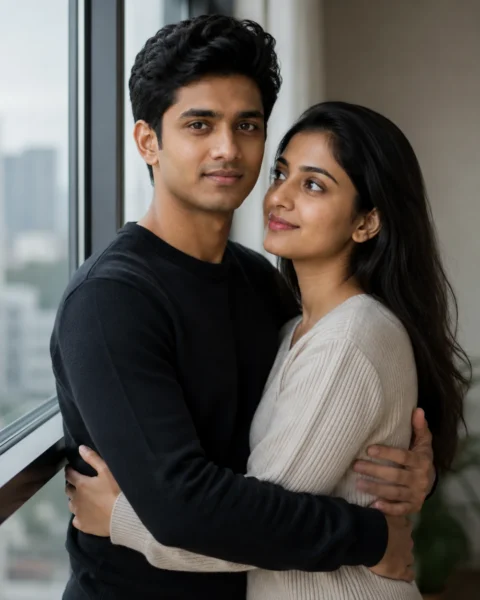
Create a natural editorial portrait of an adult couple sharing a gentle embrace beside a large apartment window.
Person One wears [a simple black crew-neck knit sweater], while Person Two wears [a simple cream-beige ribbed knit sweater]. One person looks softly toward the camera while the other looks toward their partner. Keep both faces clearly visible and positioned on a similar focal plane.
Use diffused daylight, neutral interior tones, subtle window reflections, authentic skin texture, natural hand placement, and the shallow depth of field associated with an 85mm portrait lens.
The mood should feel quiet, affectionate, and believable. Keep the background uncluttered and avoid unnecessary decorations.
Apply the reusable face-preservation instruction. Use a vertical [4:5] aspect ratio.
Customize: Clothing, interior style, weather, eye direction, color palette
Recommended Ratio: 4:5
Best Tool to Try: Gemini AI
Avoid:
Harsh reflections, hidden faces, duplicate faces, merged arms, plastic skin, warped windows, uneven head sizes, excessive blur, and watermarks.
Pro Tip: Specify exactly which person should look at the camera to prevent unnatural eye direction.
You Can Check Also: Gemini AI Sad Boy Photo Prompts 2026: 6 Copy-Paste Ideas
6. Beach Sunset Back Hug
Best For: Vacation images, travel posts, and outdoor couple portraits

Copy-Ready Prompt:
Create a photorealistic golden-hour image of an adult couple standing barefoot near the shoreline in a relaxed back-hug pose.
Person One stands in front wearing [an ivory-white sleeveless flowing maxi dress], while Person Two stands slightly behind wearing [a light beige linen button-up shirt with rolled sleeves and tan knee-length shorts]. Place both arms naturally around the waist, with the hands separate and clearly visible.
Add calm shallow waves, wet-sand reflections, soft pastel sunset colors, gentle fabric movement in the breeze, realistic skin detail, subtle rim light, and the natural perspective of a 50mm travel photograph.
Keep the pose relaxed and affectionate rather than overly dramatic.
Apply the reusable face-preservation instruction. Use a horizontal [3:2] aspect ratio.
Customize: Clothing, beach setting, sunset palette, footwear, camera angle
Recommended Ratio: 3:2
Best Tool to Try: Gemini AI
Avoid:
Merged hands, extra arms, unrealistic waves, oversaturated skies, floating feet, changed faces, distorted shorelines, logos, and watermarks.
Pro Tip: Request calm water to reduce irregular wave shapes around the couple’s legs.
7. Vertical Story Cinematic Hug
Best For: Instagram Stories, Reels covers, and mobile wallpapers
Copy-Ready Prompt:
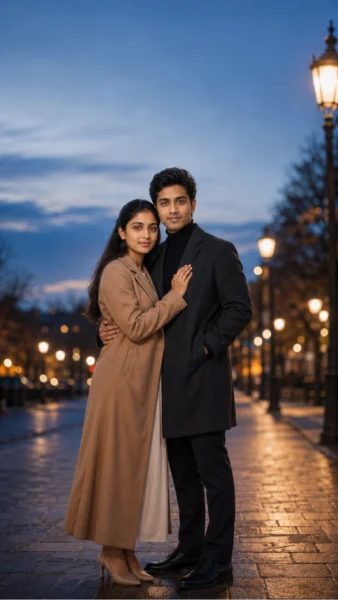
Create a full-length cinematic portrait of an adult couple sharing a gentle embrace beneath warm streetlights during blue hour.
Person One wears [a camel-tan long tailored overcoat over an ivory ankle-length dress with nude heels], while Person Two wears [a dark charcoal overcoat over a black turtleneck with black tailored trousers and black leather shoes]. Place them on a quiet pedestrian street with natural hand placement and enough space around their bodies for clean vertical framing.
Use warm streetlights, cool evening tones, soft background bokeh, believable fabric movement, realistic facial detail, subtle film grain, and balanced 50mm cinematic framing.
Leave clear negative space above the couple for a headline or quote that will be added later. Do not generate words, names, logos, or watermarks inside the image.
Apply the reusable face-preservation instruction. Use a vertical [9:16] aspect ratio.
Customize: Street design, outfits, lighting colors, mood, empty text space
Recommended Ratio: 9:16
Best Tool to Try: Gemini AI
Avoid:
Generated letters, visible logos, merged hands, cut-off feet, swapped faces, excessive blur, oversaturated neon lighting, large crowds, and watermarks.
Pro Tip: Add names or quotes in a design app after generating the image.
Useful Gemini Correction Commands
Fix One Hand
Keep both faces, clothing, pose, lighting, background, and framing unchanged. Correct only Person Two’s visible hand so it has five natural fingers and believable wrist placement.
Restore the Correct Faces
Restore Person One’s face using the first uploaded reference and Person Two’s face using the second uploaded reference. Keep the pose, clothing, lighting, background, and aspect ratio unchanged.
Separate Merged Arms
Keep the image unchanged except for the arms. Separate both arms clearly and place the visible hands naturally around the waist and upper back.
Correct Head Size
Keep the scene unchanged. Adjust both head sizes so they appear natural relative to each person’s body and distance from the camera.
Preserve Natural Skin Tone
Maintain each person’s natural skin tone from the uploaded reference. Do not lighten, darken, recolor, or over-smooth the skin.
Simplify the Background
Keep the couple unchanged. Remove distracting background objects while preserving the lighting, depth of field, and composition.
General Avoid Instruction
Add this after any prompt when needed:
Avoid blurry faces, changed identity, swapped or merged faces, duplicate people, extra people, extra arms, missing arms, extra hands, fused fingers, missing fingers, unnatural wrists, incorrect anatomy, uneven eyes, plastic skin, artificial smiles, unrealistic proportions, floating objects, cut-off heads, cut-off feet, random letters, incorrect text, watermarks, logos, brand names, excessive saturation, harsh shadows, low resolution, and duplicated accessories.
Gemini may understand this more clearly as a regular instruction beginning with “Avoid” rather than as a separate technical negative-prompt field.
Couple Prompt : Best Couple Prompt for Gemini AI: 7 Copy-Paste Romantic Photo Prompts
Couple Prompt Customization Guide
Clothing
Describe the garment type, main color, fabric, sleeve length, footwear, and one or two simple accessories. Avoid combining several complex patterns in the same image.
Hugging Pose
Choose one primary pose:
- Front hug
- Side hug
- Back hug
- Shoulder embrace
- Seated side hug
- Forehead-touching embrace
- Reunion hug
Explain where each visible hand should rest.
Background
Suitable settings include:
- Cozy home
- Minimal studio
- Café
- Flower garden
- Beach
- Mountain viewpoint
- City street
- Festive courtyard
- Airport arrival area
Mood
Select one main emotional direction, such as warm, peaceful, joyful, romantic, sophisticated, playful, or nostalgic.
Camera Framing
Use a close-up for profile images, medium framing for clothing and hand placement, full-length framing for travel scenes, or eye-level composition for natural portraits.
Lighting
Choose one clear lighting style:
- Soft window light
- Golden-hour sunlight
- Overcast daylight
- Warm indoor lighting
- Studio softbox lighting
- Blue-hour street lighting
Common Mistakes to Avoid
Using Weak Reference Photos
Dark, blurry, heavily filtered, or distant photographs make facial consistency more difficult.
Failing to Label Both People
Identify Person One and Person Two. Mention their clothing and left-right positions.
Requesting Too Many Actions
Avoid asking the couple to hug, walk, hold several objects, look in opposite directions, and pose for the camera at the same time.
Ignoring Hand Placement
Overlapping arms often lead to distorted fingers. Keep the pose simple and explain where the visible hands should rest.
Combining Conflicting Lighting
Do not request midday sunlight, candlelight, neon lighting, and soft window light in the same portrait.
Asking the Tool to Generate Exact Text
Leave clean negative space and add names, dates, or quotes afterward.
Replacing the Entire Prompt During Corrections
Keep the successful parts unchanged and correct only the weak area.
Forgetting the Aspect Ratio
Choose the final format before generating so important details are not removed during cropping.
Image Ratio Guide
1:1 works well for profile pictures and square social posts.
4:5 suits Instagram feeds, couple posters, Pinterest-style images, and portrait previews.
3:2 is suitable for travel scenes, blog images, and landscape photography.
16:9 works well for featured images, website banners, and wide cinematic scenes.
9:16 is ideal for Stories, Reels covers, and mobile wallpapers.
Consent, Privacy, and Copyright Guidance
- Upload only photographs you own or have permission to edit.
- Keep all romantic subjects clearly adult.
- Do not create romantic deepfakes involving celebrities or public figures.
- Avoid misleading relationship images involving real people.
- Do not use copyrighted movie, cartoon, comic, or anime characters.
- Avoid visible brand logos and trademark-focused clothing.
- Do not claim that a generated image documents a real event.
- Review the platform’s current privacy and commercial-use terms before uploading personal photos.
- Avoid uploading highly private photographs unless you understand the platform’s data controls.
- Keep the original prompts and generation records for images published commercially.
Conclusion
Choose the prompt closest to your preferred style, replace the bracketed details, and generate several variations. A simple pose with clear hand placement usually produces a more believable result than an overloaded scene.
Explore the related anniversary, wedding, traditional, cinematic, and romantic prompt guides on LatestImage.com for more ideas.
Frequently Asked Questions
What is the best couple hug prompt for Gemini AI?
The best prompt identifies both subjects, explains the hugging pose and hand placement, and specifies clothing, background, lighting, camera framing, face-preservation instructions, and the final aspect ratio.
Can Gemini create a couple image from two separate photos?
This may be possible when the available image-reference features support multiple uploads. Label both photographs clearly and specify each person’s clothing or position.
Can I use one existing couple photo?
Yes. A clear joint photograph can help establish both identities and their relative height. Separate close-up portraits may provide better facial detail when the faces are small.
Which aspect ratio is best?
Use 4:5 for portrait posts, 9:16 for Stories and wallpapers, 3:2 for travel scenes, 16:9 for featured images, and 1:1 for profile pictures.
Is it safe to upload personal couple photos?
Use only images you own or have permission to edit. Review the platform’s current privacy settings and data policies before uploading private photographs.